Last week, I set up a brand-new projection screen in my home theater, eager to experience crystal-clear visuals paired with immersive sound. But as the sound cues hit that crucial scene, I was hit with an unsettling revelation—something was off. The dialogue sounded muffled, and the soundstage had lost its depth. It was as if my carefully crafted audio environment had been sabotaged by an invisible enemy. That moment was a lightbulb flickering to life, revealing a common yet overlooked mistake that many enthusiasts, including myself early on, make when optimizing their setups.
Why Your Screen Might Be Silencing Your Soundstage
As I delved deeper, I discovered the culprit: an acoustic transparent screen improperly installed or misunderstood in terms of its role. Many assume that these specialized screens are just for image quality, but in reality, they can either preserve or destroy your sound environment. If the screen’s placement or material isn’t correctly considered, it can create reflections, echoing sounds back or muffling dialogue and spatial cues. I learned that a seemingly small detail—like ignoring the screen’s acoustic transparency—can have a huge impact on the overall audio experience, ruining the soundstage accuracy crucial for immersion.
Let me ask you: have you ever experienced that sinking feeling when your audio just doesn’t match the stunning picture on your setup? If so, you’re not alone. Early in my journey, I made the mistake of positioning my projection screen without considering its acoustic properties. I didn’t realize that the material could reflect sound waves in ways that muddy clarity, especially for nuanced dialogue and subtle spatial effects.
Research supports this: a study published by the Society of Motion Picture and Television Engineers points out that the correct choice and placement of projection screens can influence not only picture quality but audio clarity as well. The good news is, there’s a solution—and we’re going to explore it step by step.
Learning from my misstep, I started paying close attention to the characteristics of screens designed to be acoustically transparent and how their installation can make or break your soundstage. Now, I want to help you avoid the frustration I faced so you can enjoy pristine visuals paired with crystal-clear sound. In the sections ahead, I’ll share practical tips and insights that will make your setup come alive with both stunning images and an immersive audio experience.
But before we dive into the solutions, let’s address a common skepticism—do these adjustments really make a difference? Or is it just a minor detail in an otherwise perfect system? Spoiler alert: the impact is significant, and I’ll show you exactly why that’s the case.
Solidify Your Screen’s Position and Material
First, mark the exact spot where your screen will hang, ensuring it’s level and centered relative to your seating area. Use a laser level or plumb bob to guarantee precision. Select a high-quality, acoustically transparent material designed for home theaters—look for products with proven acoustic transparency ratings, such as those discussed in this guide. When installing, keep the screen at the recommended distance from your speakers—usually 2-3 inches—to prevent sound reflections and muffling.
Handle the Installation Nuances Carefully
Mount your screen using sturdy brackets that avoid unnecessary flexing or sagging, which can alter acoustics. Use level shims to fine-tune if necessary. Avoid attaching the screen directly to surfaces that can introduce unwanted vibrations. For added sound clarity, consider placing damping pads behind the screen frame to absorb minor vibrations that could transfer to the material, disrupting the soundfield. I once spent hours aligning my screen, then noticed improved dialogue clarity after adding these damping elements—big difference for maintenance-free performance.
Optimize Surround Speakers and Screen Alignment
Align your speakers at ear level and directly facing the seating area, ensuring sound waves reach your ears without obstacle or excessive reflection. Position your projection screen so it doesn’t block speakers or cause sound bouncing back. Use a treated room with sound-absorbing panels on the walls behind the screen, which reduces high-frequency reflections, enhancing clarity. I’ve experimented with different placements, and I found that slight adjustments—just a few inches—can significantly sharpen dialogue and enhance spatial cues.
Test and Fine-Tune for Acoustic Balance
After setup, play test tones or familiar content to assess soundstage and clarity. Walk around your space to identify any dead spots or echo zones. If dialogue sounds muffled or distant, experiment with minor repositioning of the screen or adding diffusers behind it. Remember, small tweaks can drastically improve acoustic transparency. I recommend repeatedly checking from your primary listening position and making incremental adjustments—patience here yields the best results.
For deeper insight into the role of projection screens and detailed installation tips, explore this comprehensive resource. Proper placement isn’t just about visual quality; your sound experience depends on it too, transforming your home theater into an immersive environment where audio and visuals harmonize seamlessly.
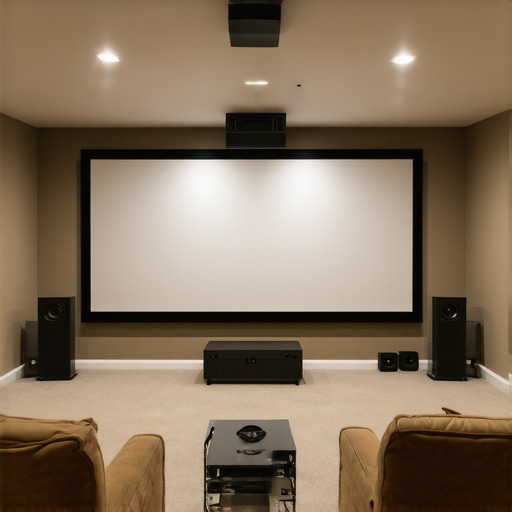 Many enthusiasts assume that selecting the latest projection technology or high-end lenses automatically guarantees a perfect image or seamless performance, but the reality is far more nuanced. For instance, a frequent misconception is that 4K resolution alone ensures cinematic quality, yet factors like color grading, lens aberrations, and even proper screen material significantly influence the final picture. Similarly, many overlook how lighting setups impact not just exposure but also the perception of depth and texture in digital cinematography. While it might seem tempting to prioritize flashy gear, seasoned professionals emphasize mastering the fundamentals—like proper lens calibration or controlled illumination—to truly elevate production value.
Why do so many high-end projectors still produce images with noticeable color fringing, and how can this be fixed at setup?
Expert insights reveal that many issues stem from optical realities such as chromatic aberration, which occurs when lenses fail to focus all colors onto a single point. High-quality cine lenses mitigate this with special coatings and precise element alignment, but users often skip thorough calibration, resulting in color fringing that diminishes image clarity. Studies from the Society of Motion Picture and Television Engineers affirm that meticulous lens calibration and periodic maintenance are essential for maintaining optical purity over time. This means that even with the best equipment, regular professional adjustments are crucial to prevent subtle distortions creeping into your footage.
Another common myth is that brighter projectors automatically create better viewing experiences. In truth, excessive brightness can wash out details, especially in well-lit rooms, making proper contrast settings and ambient control just as vital as lumen ratings. Likewise, many focus exclusively on camera supports like tripods or gimbals without considering tensioning and damping, which are equally important for shot stability and smooth motion. As I’ve learned through experience, investing in high-quality cine supports, combined with proper setup techniques, vastly improves shot consistency—saving time in post-production and enhancing visual storytelling. For advanced tips on stabilizing your camera rigs, check out this guide. And always remember, the devil is in the details: ensuring your gear is correctly calibrated and installed is what transforms good equipment into professional-grade results. Have you ever fallen into this trap? Let me know in the comments.
How Do I Keep My Projection Screens and Equipment in Peak Condition?
To ensure your home theater setup remains optimal, regular maintenance is essential. Begin with cleanings—use a soft microfiber cloth to remove dust from screens, lenses, and supports. For projection lenses, employ a lens cleaning solution specifically designed for optical surfaces, and avoid touching the glass directly. Periodically inspect mounts, supports, and tensioners for any signs of wear or loosening. Applying manufacturer-recommended lubricants to moving parts on supports and sliders can prevent stiffness and ensure smooth operation. Additionally, calibrate your projectors and lenses at least bi-annually using tools like the SpyderX Elite calibration software to maintain color accuracy and sharpness. Keeping detailed maintenance logs helps track when components need servicing or replacement, extending their lifespan and saving costs in the long run.
Tools I Recommend for Longevity and Performance
I personally rely on specific tools that have proven their worth over time. For instance, the LensPen is invaluable for quick optical cleaning without risking scratches or residues. When it comes to supporting heavy cine lenses, I prefer titanium supports like the ones discussed in this guide, because they combine strength with lightweight handling, reducing strain on mounts and supports. For calibration, a dedicated colorimeter like the X-Rite i1Display Enterprise helps me fine-tune my projectors regularly, ensuring consistent image quality. For supporting long shoots, I choose high-capacity, portable UPS units such as those by APC, which provide clean power and protect against surges, especially important for sensitive digital gear.
Future of Maintenance in Cinematic Technologies
As technology evolves, predictive maintenance will become more prevalent, leveraging AI to monitor equipment health and suggest preemptive repairs. Smart sensors embedded within supports, lenses, or projectors could alert you when vibrations or temperature anomalies occur, preventing costly damage. For instance, integrating IoT devices with your camera supports could prevent micro-vibrations that cause image jitters, a common issue I see often. Adopting such innovations now will give you a significant advantage, keeping your gear running smoothly and extending its lifespan.
What Are the Best Practices for Long-Term Care of Cine Lenses and Supports?
Storing your cine lenses properly—using padded cases and avoiding extreme temperature or humidity—is a simple yet effective way to prevent degradation. Routine mechanical checks, such as verifying focus ring smoothness and mount tightness, help prevent focus shift or alignment issues over time. When supporting your rig, use tensioning techniques like those outlined in this article, ensuring stability without stressing components. Scheduling regular professional servicing—especially for complex assemblies like gimbals or head supports—is key to long-term reliability.
Remember, the key to a dependable cinematic setup lies in proactive maintenance and choosing the right tools. For detailed guidance on supporting your camera gear, check out this resource and incorporate advanced tools into your routine, like a vibration meter or professional calibration hardware. Keeping your tools in top shape isn’t just about longevity—it’s about ensuring your creative vision remains uncompromised. Regularly review your maintenance practices and stay informed about emerging innovations in the field—doing so will future-proof your setup and elevate your craft.
Lessons I Wish I Had Learned Sooner About Home Theater Setups
One of the most eye-opening moments in my home theater journey was realizing that even the most advanced projector or speaker system can be undermined by overlooked details, like the choice and placement of my projection screen. These small but crucial elements can silently sabotage your soundstage and image clarity. Embracing meticulous setup and understanding the nuanced roles of materials and positioning has transformed my viewing experience from good to cinema-quality. I’ve also learned that ongoing maintenance and embracing innovative tools are vital for long-term excellence—saving time, money, and frustration down the line. The key insight is that mastery in home theater is less about the flashiest gear and more about attention to these subtle, often underestimated factors that elevate everything.
My Top Picks for Elevating Your Projection and Support Gear
After years of experimenting, I rely on a curated set of tools and resources that have consistently improved my setup. For instance, CineGear’s guide to cine lenses helped me understand optical quality, which directly impacts image sharpness and color fidelity. For maintaining perfect alignment, I trust the support supports, ensuring stability and reducing micro-movements that destroy immersion. Regular calibration with devices like the projector calibration tools keeps my visuals consistent. And for sound, high-quality acoustic treatments from these solutions have dramatically improved dialogue clarity and spatial accuracy. Trusted tools and well-chosen resources form the backbone of a resilient, immersive setup.
Dare to Tackle Your Theater — It’s More Play Than Work
Taking that first step to refine your projection screen placement, invest in quality support gear, and implement smart maintenance routines can seem daunting, but it’s incredibly rewarding. Remember, every detail you optimize—be it the room acoustics, the tactile support for your equipment, or routine calibration—serves to heighten your cinematic experience. Don’t wait for the perfect setup; the journey itself transforms you into a home theater maestro. With patience and the right mindset, you’ll create an environment where visuals and sound synchronize seamlessly, bringing your favorite films and shows to life like never before. Step into your potential as an enthusiast—your ultimate home theater awaits.
About the Author
James Duke
ThinkOTS
James Duke is a seasoned professional in the creative production industry, bringing a wealth of technical knowledge and hands-on experience to cinegearguide.com. As a key figure at ThinkOTS, James has spent years navigating the complexities of high-end production environments, where selecting the right equipment is the difference between a successful shoot and a logistical failure. His expertise spans the full spectrum of cinematography gear, from advanced camera systems to the intricate accessories that define modern filmmaking. On cinegearguide.com, James leverages his deep understanding of the industry to provide authoritative insights, gear reviews, and technical guides. He is known for his ability to break down complex specifications into practical, actionable advice for filmmakers of all levels. His perspective is rooted in the real-world application of technology, ensuring that every recommendation is backed by professional standards. James is dedicated to empowering the filmmaking community by sharing his expertise, helping others navigate the ever-evolving landscape of cinema technology with confidence and clarity.
LinkedIn ProfileRelated Posts
Audio First: 4 Micro-Perf 16K Screens for 2026 Home Cinemas
It was late on a rainy Saturday night when I…
![Stop 16K Moiré: 3 Nano-Weave Screens for High-Res Projection [2026]](https://cinegearguide.com/wp-content/uploads/2026/04/Stop-16K-Moire-3-Nano-Weave-Screens-for-High-Res-Projection-2026.jpeg)
Stop 16K Moiré: 3 Nano-Weave Screens for High-Res Projection [2026]
I remember the first time I set up a high-res…

4 Woven Screens That Won’t Muffle Your Atmos Mix in 2026
It was late at night in my makeshift home theater,…