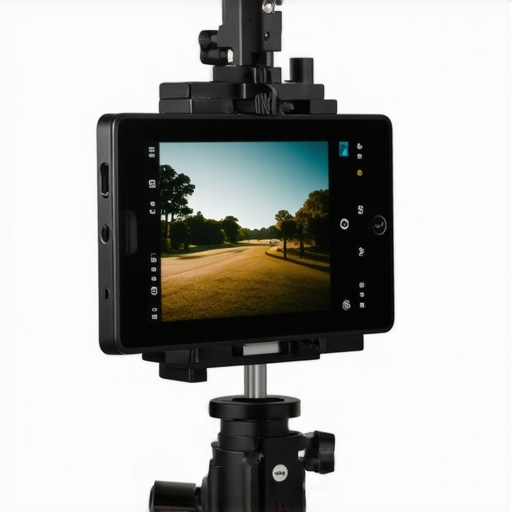
There was a moment during my first corporate shoot when I realized I’d been holding my tablet awkwardly, trying to position it just right so my talent could see the script without the audience catching a glimpse. The screen kept shifting, glare was a constant problem, and I was desperate for a stable, seamless setup. That lightbulb moment made me understand—if I want to look natural and professional, I need a reliable way to mount my iPad as a teleprompter.
The Real Challenge is Stability and Visibility
Getting an iPad to serve as a professional teleprompter isn’t as simple as just placing it in front of your camera. You need a setup that keeps the device steady, at eye level, and provides clear visibility with minimal reflections. Early on, I made the mistake of using makeshift stands that weren’t designed for this purpose. Not only did it look unprofessional, but it also disrupted my flow during shoots. The good news? There are proven methods to mount your iPad effectively, and I’ll walk you through them today.
Does it really matter how I mount my iPad?
Absolutely. A shaky, poorly positioned teleprompter can throw off your delivery, cause eye contact issues, and even spoil your shot entirely. Trust me, I’ve been there. When I first started, I underestimated the importance of a proper mount, which led to distracting jitters and reflections. According to industry experts, a stable, well-calibrated teleprompter enhances audience engagement and confidence on camera. For more on how professional lighting can elevate your setup, check out this guide.
Now that we understand why a good mounting solution matters, let’s explore how you can achieve it without breaking the bank or sacrificing ease of use. Ready to upgrade your teleprompting game? Let’s dive into the practical steps to get that perfect mount in place.
Choose the Right Support Structure for Stability
Start with a sturdy base like a flat, wide tripod or a dedicated camera support such as a cine rig. I once used an old photography tripod for a quick shoot, and the instability caused the iPad to wobble during a critical take, affecting my delivery. Replacing it with a professional-grade support like a lightweight, adjustable support from Camera Supports Demystified vastly improved stability. Ensure the support can handle the weight of your iPad and any mounting accessories without wobbling.
Utilize a Clamp or Spring-Loaded Mount
Secure your iPad using a clamp designed for tablets or a spring-loaded holder. I once improvised with a generic clamp that barely held the tablet, which slipped during a shot, causing a distraction. I then switched to a dedicated iPad clamp with padding to avoid scratches—and it worked perfectly. The clamp should attach firmly to your support and allow you to adjust the tilt to eye level while keeping the device stable.
Create a Custom Frame for Precise Positioning
Build a custom frame with foam core, PVC pipes, or metal brackets to hold your iPad at eye level. I used foam boards and velcro strips for a quick setup, but the support was shaky, leading to a shaky shot. Upgrading to a metal or rigid plastic frame, reinforced with non-slip pads, gave me crisp, steady shots. Ensure the frame aligns perfectly with your camera and is adjustable for different heights and angles.
Manage Cables and Reflections Effectively
Remove any loose cables that could tug on your setup or introduce vibrations. Use cable clips or zip ties to secure charging cables and prevent accidental yanks. I once neglected cable management, which caused the iPad to shift slightly when someone moved the cord—ruining the shot. To minimize reflections, tilt the screen slightly or use anti-reflective films, especially if you notice glare during shoots. This simple step can be the difference between a professional look and an amateur mess.
Test and Fine-Tune Before Shooting
Always run a trial recording to observe stability and visibility. I made the mistake of skipping this step and found out during the actual shoot that the angle was off and the reflections were glaring. Adjust the height, tilt, and support tightness based on test footage. Watching the playback gives insights into any unintentional movements or visibility issues, allowing you to refine your setup seamlessly.
Implementing these techniques can significantly elevate the professionalism of your teleprompting setup. Remember, a stable, well-positioned iPad not only improves your delivery but also makes your entire shoot appear more polished. For a deeper understanding of supporting gear that reduces vibrations, consider exploring this guide.
 When it comes to cinematic equipment, many professionals and enthusiasts alike fall prey to misconceptions that can hinder the quality of their projects. Let’s dig deeper into these nuances, challenge prevailing myths, and uncover some advanced mistakes often overlooked by even seasoned filmmakers.
One prevalent myth is that all cine lenses are created equal, and opting for the most expensive glass guarantees superior footage. In reality, understanding the optical nuances—like focus breathing, chromatic aberration, and flare control—is crucial. According to industry expert this guide, selecting the right lens involves more than price tags; it requires matching lens characteristics to your shooting style and project needs.
Why do overlooked lens traits matter in storytelling?
Advanced filmmakers recognize that elements such as minimal focus breathing and consistent color rendition can elevate narrative coherence. Neglecting these can introduce subtle distractions, diluting the audience’s immersion. For instance, lenses with pronounced focus breathing can be especially problematic during rack focusing shots, making transitions jarring. This is why choosing lenses with optimized focus mechanics is an investment in seamless storytelling, not just technical perfection.
Moving from optics to projection, a common trap is assuming that high lumen ratings equate directly to better image quality in projectors. However, brighter isn’t always clearer. Overly high brightness can cause color washout and reduce black levels, especially if the projector’s contrast ratio isn’t up to par. Expert this comprehensive guide details how understanding contrast, color depth, and lens shift capabilities leads to smarter equipment choices that serve your room’s specific conditions.
What advanced mistakes occur in choosing projection screens?
Many overlook the importance of screen materials and gain characteristics, assuming all screens perform equally across environments. For example, high-gain screens can amplify light but create off-axis hotspots, which compromise viewing angles. Conversely, matte white screens offer better color accuracy and uniformity. To optimize your viewing environment, consider expert recommendations and environment-specific needs, like ambient light levels and room size. For insights into the latest screen innovations, check out this resource.
Finally, a trap many fall into with lighting is believing more watts mean better image quality. Brightness is only part of the equation; color rendering index (CRI) and color temperature are equally vital. High-CRI lights ensure accurate skin tones and color fidelity, vital for professional cinematography. Advanced practitioners understand that proper lighting tuning and placement often outweigh sheer intensity, creating mood and depth that elevate storytelling. Explore this detailed guide for mastering lighting nuances.
In conclusion, avoiding these common myths and recognizing the hidden nuances can dramatically improve your cinematic results. Have you ever fallen into this trap? Let me know in the comments and share your experiences with these advanced pitfalls. Remember, expert knowledge isn’t just about high-end gear—it’s about understanding the subtle details that make your work stand out.
Maintaining your cinematic gear is crucial to ensure reliable performance and extend the lifespan of your investments. From cine lenses to projection screens, diligent upkeep and using the right tools can make a significant difference. One of my go-to strategies involves regularly inspecting and calibrating your equipment with specialized tools designed for precision. For instance, I use a lens calibration kit from this resource to keep my lenses accurately focused and minimize focus breathing over time.
What’s the secret to keeping cinema projectors in top shape?
Investing in a dedicated projector maintenance kit allows for routine cleaning of filters, lenses, and cooling vents, which are vital to prevent overheating and image degradation. I also recommend using a compressed air duster—an essential for removing dust from delicate components without risking damage. Regular alignment checks using calibration software such as this guide help maintain optimal contrast and black levels.
Long-term results require smart tools
For supporting camera rigs, I rely on high-quality, vibration-dampening supports crafted from carbon fiber. These supports reduce micro-vibrations that can affect shot stability, especially during prolonged shoots. According to industry insights, upgrading to heavy-duty support systems can dramatically improve image clarity over time. Additionally, using anti-reflective films on screens and carefully managing cables with cable ties prevents interference and deterioration of image quality.
Efficiently scale your setup without losing quality
When expanding your cinematic setup, consider modular support systems and upgrade your projection screens with new coatings that combat ambient light. Regular maintenance of these elements ensures seamless integration as your production scales. For example, upgrading to advanced graphene-backed screens guarantees consistent performance even during high-demand shoots.
Looking ahead, trends indicate that DIY calibration and maintenance will become more accessible thanks to AI-powered diagnostic tools, simplifying complex tasks. For now, I encourage you to adopt a proactive maintenance routine, such as calibrating your lenses and screens regularly, and investing in quality supports and cleaning tools. Implementing these practices will keep your cinematic setup performing flawlessly, shot after shot. Don’t hesitate to try out one of these advanced calibration techniques—your gear will thank you for it!
What I Learned the Hard Way About Stability and Precision
One crucial lesson was realizing that even the best cinematic shots can be marred by small, overlooked details in your support setup. I once thought a lightweight tripod would suffice, but during a key scene, micro-vibrations caused micro-shakes, ruining the shot and teaching me that investing in robust, vibration-dampening supports truly pays off. This experience made me appreciate the importance of professional-grade gear, like carbon fiber supports designed specifically for cinematic stability.
Discovering How Fine-Tuning Changed My Workflow
After countless trial-and-error sessions, I observed that precise calibration of my camera supports and quick-release plates dramatically improved shot consistency. It’s not just about sturdy supports; it’s about smart adjustments to eliminate sway and wobble. Regularly checking and fine-tuning your gear ensures your support system becomes an invisible foundation that allows your storytelling to shine without technical distractions.
Why Cable Management Became My Secret Weapon
Untangling and securing cables might seem trivial, but I’ve learned that cluttered or loose wiring can subtly tug on your devices, leading to frame shifts or glare issues. Using cable ties and protective clips not only keeps my setup tidy but also prevents accidental disconnections. As I mastered cable management, I noticed a marked improvement in the steadiness of my shots and overall professional look—an often underrated aspect of support systems.
The Power of Routine Checks and Maintenance
Simply put, neglect leads to surprises during critical shoots. Developing a regular routine for inspecting and calibrating my camera supports and projection screens has saved me from many temperature-related drifts and misalignments. This discipline prolongs equipment lifespan and maintains peak performance, which is vital for consistent, high-quality results. Remember, proactive care is your best investment in cinematic excellence.
Resources That Elevated My Support Game
- Camera Supports Demystified: This guide helped me decode the complexities of support options, guiding me toward supports that blend lightweight design with maximum stability.
- How to Calibrate Your Projection Screen: A detailed resource on ensuring your display area maintains consistent black levels, crucial for professional presentations and filmmaking.
- Mastering Film Lighting Techniques: Combining proper lighting with stable support setups transforms raw footage into visually compelling stories—this guide offers actionable tips to enhance both.
- Support Equipment Maintenance Tools: Investing in specialized maintenance kits and calibration software has kept my gear performing flawlessly over time.
Your Next Dream Shot Starts With Smart Support
Every successful cinematic project hinges on the foundation—your support system. By applying these insights and regularly refining your setup, you pave the way for smoother shoots and stunning visuals. The difference is in the details; focus on perfecting your camera supports and see how much your storytelling evolves. Ready to take your support system to the next level? Dive into these resources, and your future shots will thank you.
Have you encountered unexpected shake or wobble during a shoot? Share your experiences below and let’s troubleshoot together!
About the Author
James Duke
ThinkOTS
James Duke is a seasoned professional in the creative production industry, bringing a wealth of technical knowledge and hands-on experience to cinegearguide.com. As a key figure at ThinkOTS, James has spent years navigating the complexities of high-end production environments, where selecting the right equipment is the difference between a successful shoot and a logistical failure. His expertise spans the full spectrum of cinematography gear, from advanced camera systems to the intricate accessories that define modern filmmaking. On cinegearguide.com, James leverages his deep understanding of the industry to provide authoritative insights, gear reviews, and technical guides. He is known for his ability to break down complex specifications into practical, actionable advice for filmmakers of all levels. His perspective is rooted in the real-world application of technology, ensuring that every recommendation is backed by professional standards. James is dedicated to empowering the filmmaking community by sharing his expertise, helping others navigate the ever-evolving landscape of cinema technology with confidence and clarity.
LinkedIn ProfileRelated Posts
The Real Reason Your Follow Focus Has Play and How to Fix It
One afternoon, I was shooting a perfectly rehearsed scene when…
Best Cine Lenses and Camera Supports for Filmmakers in 2024
Discovering the Magic of Cine Lenses: My Personal ExperienceAs a…
![3 Carbon-Fiber Cine Primes for Lightweight 16K Drone Shoots [2026]](https://cinegearguide.com/wp-content/uploads/2026/04/3-Carbon-Fiber-Cine-Primes-for-Lightweight-16K-Drone-Shoots-2026-1.jpeg)
3 Carbon-Fiber Cine Primes for Lightweight 16K Drone Shoots [2026]
I remember the exact moment I flat out failed during…