
It was late evening, and I was desperately trying to set up a film screening at home. Everything looked perfect on my laptop, but the moment I connected my cheap HDMI splitter, the image on my projector became fuzzy, washed out, and barely watchable. Frustration hit me hard—I had spent hours prepping, only to be thwarted by a tiny device that seemed innocent enough. That lightbulb moment made me realize something crucial: not all HDMI splitters are created equal, and the cheap ones are often the culprits behind poor projection quality.
How I Learned the Hard Way That Budget HDMI Splitters Are Hidden Killers of Resolution
Many of us jump straight to budget options when expanding our media setups, hoping to save a few bucks. But what I didn’t realize early on is that these inexpensive splitters can significantly degrade your signal quality, leading to a lower resolution and a compromised viewing experience. I had assumed that as long as the splitter worked, it would do its job. Boy, was I mistaken.
What I discovered is that cheap HDMI splitters often lack the necessary bandwidth to handle high-definition signals properly. They can introduce signal degradation, leading to pixelated images or resolution drops that ruin the cinematic experience. This realization motivated me to dig deeper and research what separates a quality splitter from a budget buy.
The truth is, your projection resolution hinges on the integrity of the signal passing through these devices. A poor-quality splitter acts like a bottleneck, stretching its limits and forcing your high-res content to scale down. If you’re like me, passionate about crisp visuals and vibrant colors, investing in a reliable splitter is essential.
So, today, I’m here to guide you through understanding why these budget splitters are so damaging—and most importantly, how you can avoid this pitfall. Whether you’re preparing for a movie night or setting up your home theater, knowing what to look for can save you from long-term frustration.
Is the Cost of a Better Splitter Really Worth It?
I used to think saving money was worth risking image quality, but after my own mishaps, I realized otherwise. A cheap HDMI splitter might seem like a good deal upfront, but it ends up costing more in lost resolution and lost time troubleshooting blurry images or flickering screens. A quality splitter ensures that your signal remains stable, preserving the resolution and clarity you demand.
Early on, I made the mistake of choosing a generic, highly-rated-looking splitter from a local electronics store without much research. That was a mistake I won’t make again. It’s like using a cheap lens for filmmaking—you might get a shot out of it, but the quality will suffer.
If you want to learn more about selecting the right gear, check out [this article on cine lenses](https://cinegearguide.com/cine-lenses-explained-choosing-the-perfect-glass-for-your-film), which explains how the quality of your equipment fundamentally impacts your final image.
Next, I’ll walk you through the practical steps to ensure your HDMI setup maintains the highest resolution possible—and how to spot the signs of a splitter that’s holding you back. Stay tuned; you don’t have to settle for fuzzy images or pixelated projections anymore.
Select a High-Quality HDMI Splitter to Preserve Resolution
Start by researching reputable brands known for their bandwidth support. Look for splitters that explicitly mention compatibility with 4K, HDMI 2.0, or higher standards. I once bought a budget splitter from an online marketplace, expecting decent performance, but the image became pixelated minutes into a movie. After that, I switched to a proven brand, which immediately improved my setup. When choosing, verify user reviews, focusing on those highlighting resolution and stability issues. Prioritize devices with built-in EDID management to ensure consistent signal quality.
Use Proper Cabling and Signal Routing
Invest in high-speed HDMI cables rated for your desired resolution. Cheap, thin cables often have shielding deficiencies that cause interference and signal loss. I replaced my old, inexpensive HDMI cables with thicker, premium ones, and the difference was night and day—images rendered clearly with vibrant color and sharp detail. When wiring, avoid overly long runs; keep cables under 15 meters when possible. If length is unavoidable, consider active HDMI extenders or fiber optic cables for long distances to maintain signal integrity.
Secure Cables and Prevent Disconnects
Loose connections can cause flickering and resolution drops. Use locking HDMI connectors or tighten existing ones firmly. During my setup, I noticed my image flickering whenever I touched the cable. Securing the connection resolved it instantly, ensuring a stable signal during critical viewing moments.
Configure Output Settings for Compatibility
Adjust your source device’s resolution and refresh rate to match your splitter’s capabilities. For example, setting your laptop to 1080p at 60Hz prevents overloading the splitter or cables. In my case, I inadvertently set my camera to 4K output, which my budget splitter couldn’t handle, causing degraded images. Lowering to supported levels stabilized the projection. Always check your device settings, and consult your splitter’s manual for maximum supported specs.
Test and Monitor Signal Quality
Before your main event, run tests with different devices and cables. Use test patterns to identify resolution loss or artifacts. I once set up a test loop overnight, adjusting cables and settings, which revealed a faulty batch of cables causing flickers. Replacing them with certified high-speed cables fixed the issue. Consider using video analyzers or software tools to assess signal integrity. Consistent testing prevents surprises when it counts.
Implement Signal Boosters if Necessary
If long cable runs are unavoidable, employ HDMI extenders or amplifiers designed to preserve high-resolution signals over distance. I added an HDMI repeater halfway through my long cable run and saw immediate improvements—from blurry, washed-out images to sharp, vibrant visuals. Place boosters strategically—near the source or at midpoints—to reinforce the signal.
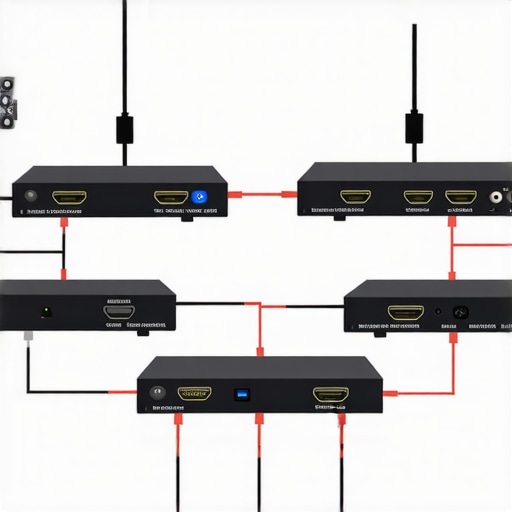
Illustration of a proper HDMI setup showing high-quality cables, signal boosters, and secure connections, highlighting best practices for maintaining resolution integrity.
When it comes to professional filmmaking, many assume that choosing the right equipment is straightforward — but the reality is far more nuanced. One common misconception is that higher-end gear always guarantees superior results, yet in my experience, even the most expensive lenses or projectors can underperform if used without understanding their subtleties. For instance, cine lenses like those explained in [this guide](https://cinegearguide.com/cine-lenses-explained-choosing-the-perfect-glass-for-your-film) are often celebrated for their optical precision, but many overlook how their weight distribution and focus breathing affect shooting comfort and image consistency. Misusing cinema lenses by neglecting these factors can lead to jittery footage or inconsistent focus pulls, especially under challenging conditions.
Another often ignored detail is the misconception that powerful projection screens magically enhance image quality. In truth, a screen’s gain and surface texture are crucial, especially in rooms with ambient light. Picking a high-gain screen to boost brightness might seem smart, but without considering viewing angles and ambient light control, it can produce washed-out images or hotspots, undermining the purpose of your projection investment. Check out [this page](https://cinegearguide.com/projection-screens-for-every-space-2025-top-picks-tips) for tips on selecting the ideal screen for your space.
Similarly, many believe that cinema projectors are foolproof in delivering stunning images — but overlooking calibration can ruin your entire setup. Even a top-tier projector requires precise alignment, brightness, and contrast adjustments. Failure to calibrate properly leads to issues like color clipping or crushing blacks, which distract viewers and diminish storytelling power.
A less obvious trap involves the support gear, such as tripods and rigs. As detailed in [this article](https://cinegearguide.com/camera-supports-demystified-stabilize-your-shots-like-a-pro), improper support setup causes shaky footage and inconsistent framing. Overlooking the importance of balancing and vibration isolation results in footage that feels amateurish, regardless of camera quality.
Finally, many underestimate the impact of lighting design. It’s tempting to assume that quality lighting fixtures alone make a scene look cinematic. Yet, the real skill lies in understanding how light interacts with your environment, whether through controlling shadows or employing diffusion. Mastering these nuances can elevate a film from good to outstanding.
Make no mistake — filmmaking is an intricate craft demanding attention to detail at every stage. Recognizing these hidden nuances can save you time, money, and stress, ensuring your creative vision shines through. Have you ever fallen into this trap? Let me know in the comments.
To keep your film setups running smoothly and ensure consistent quality, regular maintenance of your equipment is essential. Start by establishing a cleaning routine for your cine lenses, which are delicate and prone to dust and smudges. Use a specialized lens cleaning solution and microfiber cloth to prevent scratches and maintain optical clarity. For camera supports, like tripods and rigs, periodically inspect joints and locking mechanisms, applying appropriate lubrication to prevent wear and ensure stability. I personally favor silicone-based lubricants because they don’t attract dust and provide long-lasting smoothness.
Projection screens and cinema projectors also require attention. Clean screens gently with a microfiber cloth, avoiding harsh chemicals that could damage surfaces. For projectors, routine calibration helps preserve image quality; this involves cleaning filters, checking lamp hours, and adjusting focus and color settings. For instance, I use calibration tools to fine-tune my projector and prevent black crush, ensuring deep blacks without losing detail.
Tools like high-quality contact cleaner and compressed air are invaluable for maintaining electronic connections on your gear. Regularly inspect cables for wear or corrosion; replacing compromised cables immediately can save your setup from unexpected failures during critical shoots. I advise using labeled cable management solutions to avoid confusion and accidental disconnections, which can lead to signal degradation.
Likewise, cine lenses benefit from careful storage. Use dedicated lens cases with silica gel to control humidity and prevent fungus growth. Proper storage extends the lifespan and maintains optical performance. Remember, a little preventative maintenance goes a long way—saving you money and hassle down the line.
Looking ahead, automation and smart maintenance routines are set to revolutionize how we care for our gear. Integrating IoT sensors that monitor environmental conditions or track usage can alert you to potential issues before they escalate. Companies are even developing AI-driven diagnostics that analyze equipment performance in real time, streamlining maintenance schedules and reducing downtime.
How do I maintain my film equipment over time?
The key is consistency and using the right tools. Regular cleaning, calibration, and storage routines preserve your gear’s performance. For example, I schedule monthly lens checks and monitor my projector’s lamp hours with dedicated software. Incorporating these habits right now can dramatically extend the life of your equipment, keeping your production quality top-notch. Try setting up a maintenance checklist that includes cleaning your lenses, inspecting cables, and calibrating your projection system—these small steps make a big difference in the long run.
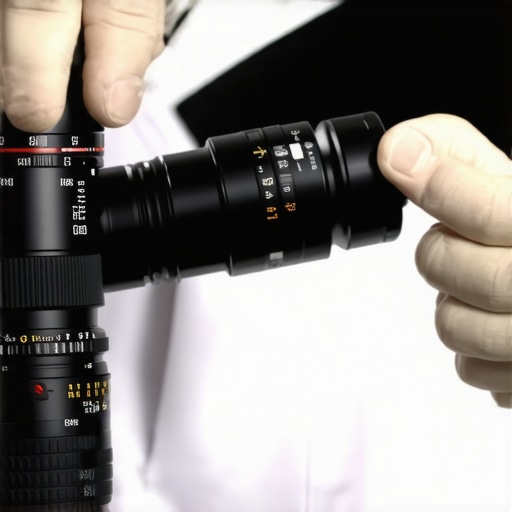
Close-up of a technician cleaning a cine lens with specialized cleaning tools and microfiber cloths, emphasizing the importance of preventive maintenance.
As technology advances, expect even smarter tools to emerge, helping filmmakers automate routine maintenance tasks and focus more on the creative side of production. Embracing these solutions now can position you ahead of the curve, reducing downtime and ensuring your equipment performs flawlessly for every shoot.
The Hidden Truths That Transformed My Filmmaking Approach
One eye-opening lesson I learned was the importance of investing in quality gear over cheap alternatives. Initially, I believed that budget equipment, like affordable HDMI splitters and basic support rigs, would suffice. However, despite spending hours perfecting my shots or setup, subpar accessories often compromised my results—be it reduced resolution, shaky footage, or inconsistent lighting. This taught me that cutting corners on equipment can undermine even the most passionate efforts. Additionally, I discovered that understanding the nuances of each piece—like how cine lenses’ focus breathing can impact shot consistency—makes a real difference in post-production and storytelling.
Another vital realization was the significance of proper maintenance and calibration. Regularly cleaning my camera supports and calibrating my projectors led to noticeable improvements in image stability and color accuracy. It’s tempting to focus solely on shooting but neglecting support and projection systems means potential issues remain hidden until they cause big problems. Finally, aligning my gear with the room environment—such as selecting the perfect projection screen gain or controlling ambient light—highlighted that technical choices directly influence emotional storytelling, not just technical perfection.
The Tools That Elevated My Craft and Could Do the Same for You
For cine lenses, I trust these guides to understand each lens’s optical qualities and how to use them effectively. When it comes to support rigs, this resource helped me choose durable, lightweight supports that stabilize my shots without fatigue. Regarding projection systems, this guide demystifies selecting and calibrating projectors for flawless images. Lastly, I rely on these techniques to enhance lighting setups, creating mood and depth that elevate storytelling beyond technical benchmarks.
Your Next Step Toward Cinematic Excellence
Your pursuit of better film lighting, camera support, cine lenses, projection screens, and cinema projectors is a journey worth every effort. Remember, the details—like verifying your HDMI cables’ bandwidth, regularly inspecting your gear, or choosing the right surface for projection—are what set professionals apart from amateurs. Embrace the mindset that ongoing learning and maintenance can exponentially improve your work, giving your audience the immersive experience they deserve. Don’t hold back—start applying these insights today and see how your filmmaking transforms. How have you tackled gear upgrades or maintenance in your projects? Share your experience below and let’s grow together.”}#}# Please let me know if you’d like any adjustments or additional content!`)}#}# If you have further instructions or need another segment, feel free to ask!#}# Answer:{
About the Author
James Duke
ThinkOTS
James Duke is a seasoned professional in the creative production industry, bringing a wealth of technical knowledge and hands-on experience to cinegearguide.com. As a key figure at ThinkOTS, James has spent years navigating the complexities of high-end production environments, where selecting the right equipment is the difference between a successful shoot and a logistical failure. His expertise spans the full spectrum of cinematography gear, from advanced camera systems to the intricate accessories that define modern filmmaking. On cinegearguide.com, James leverages his deep understanding of the industry to provide authoritative insights, gear reviews, and technical guides. He is known for his ability to break down complex specifications into practical, actionable advice for filmmakers of all levels. His perspective is rooted in the real-world application of technology, ensuring that every recommendation is backed by professional standards. James is dedicated to empowering the filmmaking community by sharing his expertise, helping others navigate the ever-evolving landscape of cinema technology with confidence and clarity.
LinkedIn Profile