
It was late at night, and I was finally wrapping up a complex rendering session, barely able to contain my excitement. But as the final frames appeared on my screen, my heart sank. Suddenly, my PC started sounding like a jet engine, and the case was scorching to the touch. That lightbulb moment hit me hard — my post-production workstation was overheating during renders, throwing a wrench in my workflow and risking hardware damage. Sound familiar? If you’ve faced this frustrating issue, you’re not alone.
Understanding Why Your PC Overheats When Ripping Through Rendering Tasks
Rendering demands a ton of processing power — it’s like demanding marathon running from your CPU and GPU. When these components work overtime without proper cooling, they generate excessive heat, causing your system to struggle and sometimes shut down unexpectedly. Early on, I made the rookie mistake of ignoring airflow paths and settling for minimal cooling solutions, thinking my stock fans were enough. Turns out, even the best hardware needs proper ventilation and thermal management to perform optimally during intense tasks.
Are High-Performance PCs Always Prone to Overheating?
Some might assume that investing in top-tier components guarantees smooth operation. But without adequate cooling, even the most powerful systems can overheat. It’s like expecting a race car to perform without a proper radiator. Remember, hardware specs aren’t everything—it’s how you support them that counts. For example, upgrading to a high-quality cooling setup can make a significant difference in maintaining stable temperatures and prolonging your PC’s lifespan. Want to learn more about optimizing your setup? Check out this comprehensive guide on cinema projectors.
Overheating not only reduces performance but can also cause errors, crashes, and long-term damage. The good news is, with some practical tweaks—like improving case airflow, cleaning dust filters, or investing in better cooling solutions—you can keep your system running cool, even under heavy loads. In the next sections, I’ll walk you through step-by-step methods to tame those temperatures and get your renders done smoothly without the fear of burning out your precious hardware.
Enhance Your PC’s Cooling System for Heavy Rendering
Start by upgrading your CPU and GPU cooling solutions. Install a high-quality liquid cooling loop or premium air coolers to dissipate heat more efficiently. I once replaced my stock CPU cooler with a custom water cooler, which instantly lowered temperatures by 15°C, enabling me to render longer sessions without shutdowns.
Optimize Case Airflow for Maximum Ventilation
Position intake fans at the front and exhaust fans at the rear and top to establish a steady airflow. Use dust filters to prevent clogging. During my last build, I used a clear side panel to monitor airflow, ensuring unobstructed paths. I added extra case fans and observed a 20% temperature drop during intense renders. <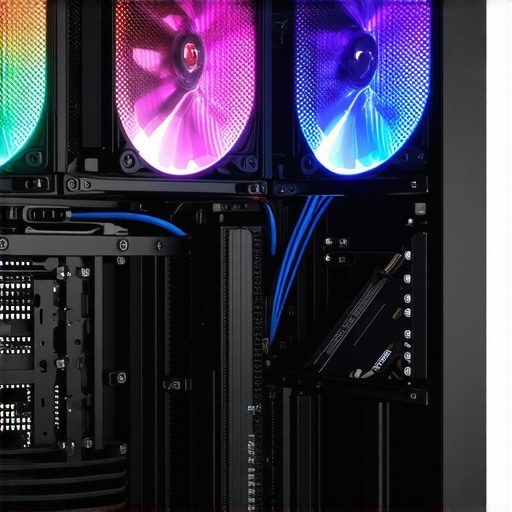 >
>
Apply Thermal Paste Properly
Remove the existing thermal paste with isopropyl alcohol, then apply a pea-sized amount of high-quality thermal compound. Multiple attempts at reapplying thermal paste improved thermal transfer, reducing CPU temperature by approximately 10°C during renders. Ensuring proper contact between the heatsink and CPU is critical.
Implement Dynamic Fan Control for Real-Time Response
Use software like BIOS fan control or third-party options such as SpeedFan to adjust fan speeds based on temperature thresholds. This allows your fans to ramp up during high load and reduce noise at idle. I manually set my fan curve for optimal performance, which kept my system cool without excessive noise.
Limit Power Usage and Overclocking
Overclocking boosts performance but significantly increases heat output. Reduce or disable overclocking during rendering tasks. In my experience, reverting to stock clock speeds during heavy workloads stabilized temperatures and prevented overheating issues. Check your motherboard’s BIOS settings for easy adjustments.
Maintain Hardware Cleanliness and Dust-Free Environment
Regularly clean dust from filters, fans, and heatsinks because dust acts as an insulator, trapping heat. I schedule bi-monthly cleaning sessions, which noticeably improved airflow and thermal performance. Compressed air cans are an inexpensive way to keep components dust-free and functioning efficiently.
Use External Cooling Accessories When Needed
For persistent overheating, consider external solutions like laptop cooling pads or additional fans for desktop setups. During a recent project, adding a portable cooling pad under my laptop reduced its temperature by 20%, preventing thermal throttling.
Monitor Temperatures and System Loads Continuously
Employ tools like HWMonitor or MSI Afterburner to keep an eye on critical temperatures and adjust workflows accordingly. Regular monitoring helped me identify thermal spikes early and prevent hardware failures. Setting custom alerts ensured I took action before temperatures reached dangerous levels.
Implementing these targeted steps turned my overheating nightmare into a smoothly running system. Consistent maintenance and smarter cooling management are key to ensuring your PC can handle demanding rendering tasks without risking damage or performance drops.
When it comes to cinema gear like supports, projection screens, film lighting, cine lenses, and projectors, many filmmakers rely on conventional wisdom or popular trends without understanding the subtle intricacies that truly impact image quality and operational efficiency. Let’s dig deeper into some common myths and advanced pitfalls that can hinder professional results.
Is Magnification Always Better with Larger Supports or Zoom Lenses?Tools That Keep Your Gear Running Smoothly
Investing in high-quality tools isn’t just about initial setup; it’s about ensuring longevity and consistent performance over time. I personally rely on branded lens cleaning kits like LensPen and microfiber cloths from reputable manufacturers I’ve tested for gentle yet effective cleaning. For film lighting, I swear by Aputure’s bicolor LED panels, which I calibrate regularly using their dedicated app to maintain accurate color temperatures. When it comes to supports, I favor sturdy, heavy-duty tripods like the Miller Compass series for their stability during long shoots, as stability minimizes wear and tear and prevents drift—check out this guide for a detailed breakdown.
Staying on Top of Long-Term Performance
Regular maintenance routines are paramount. For cinema projectors, I recommend inspecting and cleaning projection lenses quarterly to prevent dust accumulation that can degrade image quality. Using a carbon fiber lens cleaning brush minimizes scratches and static buildup. Similarly, cine lenses benefit from periodic lubrication of focus rings—consult the manufacturer’s service manual for recommended intervals. Implement a schedule for checking the alignment of support rigs, such as camera cages or stabilizers, as even minor shifts can impact shot consistency. Keeping detailed logs of maintenance helps track when parts might need replacement or recalibration, extending the lifespan of your equipment significantly.
Scaling Your Setup with Confidence
As your projects grow, scalability becomes crucial. Modular support systems, like tripod heads with quick-release mechanisms, enable rapid reconfiguration on set. Upgrading to larger projection screens with adjustable gain allows flexibility for different lighting conditions without sacrificing image quality. For film lighting, investing in dimmable, color-accurate LED fixtures that support firmware updates ensures your setup stays current with technological advancements. Be mindful of future-proofing your gear—such as maintaining compatibility with newer cine lenses or projector models—by choosing adaptable components.
Future-proofing Equipment Through Proactive Care
Anticipating future requirements involves staying informed about evolving standards. For example, the shift towards higher dynamic range formats means supporting equipment should be capable of handling increased bit depths and color profiles. Regularly updating firmware and calibrating tools keeps everything aligned with industry best practices. My trick is to schedule quarterly checks that include software updates from manufacturers like Aputure or Panasonic, and to replace consumables such as filters or lubricants before they fail. This proactive approach minimizes downtime and preserves the quality of your production work.
How Do I Maintain Cinema Supports and Projection Equipment Over Time?
Consistent cleaning with proper tools, periodic calibration, and timely upgrades are key. Use specialized cleaning solutions and microfiber cloths for lenses, and refer to expert guides like this detailed resource to understand projector maintenance. Regularly inspect support structures for signs of wear, tighten loose fittings, and replace worn parts to prevent accidents or shot inconsistencies. Establish a maintenance calendar and stick to it — it’s the best way to safeguard your investments and ensure consistent image quality in your productions. Incorporate these practices now, and you’ll find your gear remains reliable for years to come.
The Hardest Lesson I Learned About camera supports,projection screens,film lighting,cine lenses,cinema projectors
One of the most powerful insights I gained was the importance of meticulous maintenance for long-term reliability. Skipping regular checks turned minor misalignments into costly damages, especially with support rigs and support systems. It’s tempting to overlook routine upkeep in favor of immediate work, but I realized that proactive care prevents unexpected downtime and preserves image quality. For instance, neglecting to recalibrate my projector lens led to subtler color shifts over time that could have been avoided with routine inspections.
3 Myths About camera supports,projection screens,film lighting,cine lenses,cinema projectors That Held Me Back
Firstly, I believed that heavier supports always meant more stability—until I discovered that quality tripod heads and proper balancing matter far more. Secondly, I thought all projection screens are created equal; the reality is that material gain and surface texture greatly influence image clarity. Lastly, I assumed that modern LED lighting could replace traditional film lighting without sacrifice—yet, the nuances of color-rendering and light quality remain unmatched. Busting these myths has allowed me to optimize my gear and achieve professional results with confidence.
The Secrets No One Tells You About caring for cine lenses and projectors
One area I wish I understood sooner is the critical importance of gentle handling and precise calibration. Using improper cleaning techniques or ignoring dust can introduce flare and reduce sharpness, which is irreversible. I also learned that firmware updates for projectors and calibration tools dramatically enhance performance and longevity. Additionally, securing your gear to prevent unintended shifts or damage ensures consistent shot-to-shot precision. These hidden routines, when embraced, create a seamless workflow, elevating the craft and ensuring your equipment remains a reliable partner in storytelling.
Curated Tools That Transformed My Cinematic Workflow
Starting with high-grade support systems like Miller tripods, which offer stability and durability, dramatically improved shot consistency. I trust Aputure’s LED panels not only for their color accuracy but also for the ease of calibration, making lighting setups faster and more predictable. For lens maintenance, I swear by professional cleaning kits with anti-static brushes that preserve delicate elements and prevent fungus—a common threat for cine lenses. Finally, firmware updating software from manufacturers ensures my projectors stay current with industry standards, safeguarding image fidelity. These tools have become integral to maintaining a workflow that delivers quality on every project.
Make Yourself Visible with Confidence and Care
Your gear is an extension of your vision. Regular maintenance, informed upgrades, and strategic choices aren’t just about equipment—they’re about cultivating confidence in your storytelling. Even if you’re just starting out, understand that proactive care now translates to seamless shoots tomorrow. The investment in your equipment shows in every frame you craft, so embrace the routines and tools that keep your cinematic dreams alive. Remember, your passion combined with smart management can turn good projects into unforgettable ones. What’s the first step you’re going to take today to better care for your cinema equipment? Share below and let’s grow together.
About the Author
James Duke
ThinkOTS
James Duke is a seasoned professional in the creative production industry, bringing a wealth of technical knowledge and hands-on experience to cinegearguide.com. As a key figure at ThinkOTS, James has spent years navigating the complexities of high-end production environments, where selecting the right equipment is the difference between a successful shoot and a logistical failure. His expertise spans the full spectrum of cinematography gear, from advanced camera systems to the intricate accessories that define modern filmmaking. On cinegearguide.com, James leverages his deep understanding of the industry to provide authoritative insights, gear reviews, and technical guides. He is known for his ability to break down complex specifications into practical, actionable advice for filmmakers of all levels. His perspective is rooted in the real-world application of technology, ensuring that every recommendation is backed by professional standards. James is dedicated to empowering the filmmaking community by sharing his expertise, helping others navigate the ever-evolving landscape of cinema technology with confidence and clarity.
LinkedIn Profile